
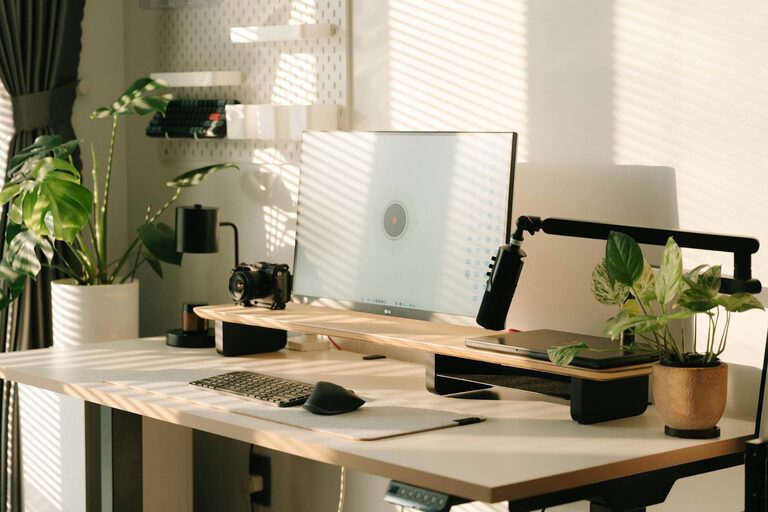
Creating a home office space that is both comfortable and productive can make a significant difference in your work-from-home experience. Whether you’re working full-time remotely or just need a dedicated spot for occasional tasks, a well-designed workspace can help you focus, reduce stress, and improve efficiency.
In this post, we’ll explore key tips for setting up a home office that supports your work needs while also making the environment pleasant and inviting.
Choose the Right Location
The first step in creating a home office is picking the ideal spot. Consider the following:
– Quiet and Private: Select a location away from household noise and distractions.
– Natural Light: Whenever possible, set up near a window to benefit from natural light, which can boost mood and energy.
– Space: Ensure there is enough room for your desk, chair, and any additional equipment or storage you need.
If space is limited, a corner of a living room or bedroom can work, provided it’s organized and clearly designated as a workspace.
Invest in Ergonomic Furniture
Comfort is essential for long hours at your desk. Paying attention to ergonomics can prevent discomfort and improve your posture.
– Chair: Choose an adjustable chair with good lumbar support. Your feet should rest flat on the floor, and your knees should be at a 90-degree angle.
– Desk: Pick a desk at a height that allows your elbows to be at a 90-degree angle when typing.
– Monitor Placement: Position your computer monitor at eye level, about an arm’s length away, to reduce neck strain.
If possible, consider a sit-stand desk to alternate between sitting and standing throughout the day.
Organize and Declutter Your Space
A tidy workspace helps clear your mind and enables better focus.
– Storage Solutions: Use shelves, filing cabinets, or desk organizers to keep documents and supplies neat.
– Minimalism: Keep only essentials on your desk. Remove unnecessary clutter regularly.
– Cable Management: Use clips or cable sleeves to organize wires and prevent tangles.
Having a clutter-free environment saves time and reduces stress.
Optimize Lighting
Proper lighting can reduce eye strain and keep you alert.
– Combine Light Sources: Use ambient lighting along with task lighting, such as a desk lamp.
– Avoid Glare: Position your monitor perpendicular to windows to prevent glare.
– Warm vs. Cool Light: Consider warm lighting in the evening to wind down and cooler light during the day to stay focused.
Adjust light settings based on your work schedule and natural daylight.
Personalize Your Workspace
Adding personal touches can make your office feel welcoming and motivate you.
– Plants: Indoor plants improve air quality and add a calming natural element.
– Artwork: Hang pictures or posters that inspire or make you happy.
– Accessories: Use colorful stationery, a comfortable mouse pad, or decorative organizers that suit your style.
A personalized space can boost creativity and job satisfaction.
Minimize Distractions
Creating boundaries is important to maintain productivity.
– Set Work Hours: Stick to a schedule to separate work time from personal time.
– Use Noise-Canceling Headphones: These can help block out background noise.
– Limit Technology: Turn off notifications or use focus modes on devices when working.
Communicate with family members or housemates about your working hours to minimize interruptions.
Incorporate Healthy Habits
Your workspace should support your wellbeing in addition to your work tasks.
– Breaks: Take regular short breaks to stretch, hydrate, and rest your eyes.
– Movement: Stand, walk, or do simple exercises during the day to avoid stiffness.
– Hydration Station: Keep a water bottle nearby to remind yourself to drink fluids.
Healthy habits contribute to sustained productivity and overall health.
Use Technology Wisely
Equip your home office with reliable tools that enhance your workflow.
– High-Speed Internet: A stable connection is key for virtual meetings and online tasks.
– Quality Headset or Microphone: Good audio improves communication.
– Backup Supplies: Extra chargers, batteries, or a second monitor can prevent interruptions.
Investing in the right technology will make your work smoother and less frustrating.
—
Creating a home office that balances comfort and productivity is about thoughtful planning and personalization. By choosing the right location, investing in ergonomic furniture, staying organized, optimizing lighting, and maintaining a healthy work routine, you can build a space that supports your best work every day. Start small, make adjustments as needed, and enjoy the benefits of a well-designed home workspace.